

You schedule once, and the engine generates the sessions itself
A class, a physio session or a court: all three use the same rules for capacity, waitlist, cancellation and passes. You set it up once per branch and the calendar builds itself, up to 3 months ahead.
Every class has its own capacity, its room and who teaches it
You build the pattern once and the system generates the calendar sessions by itself, up to 3 months ahead. If it fills up, the waitlist reorders itself as soon as someone cancels.
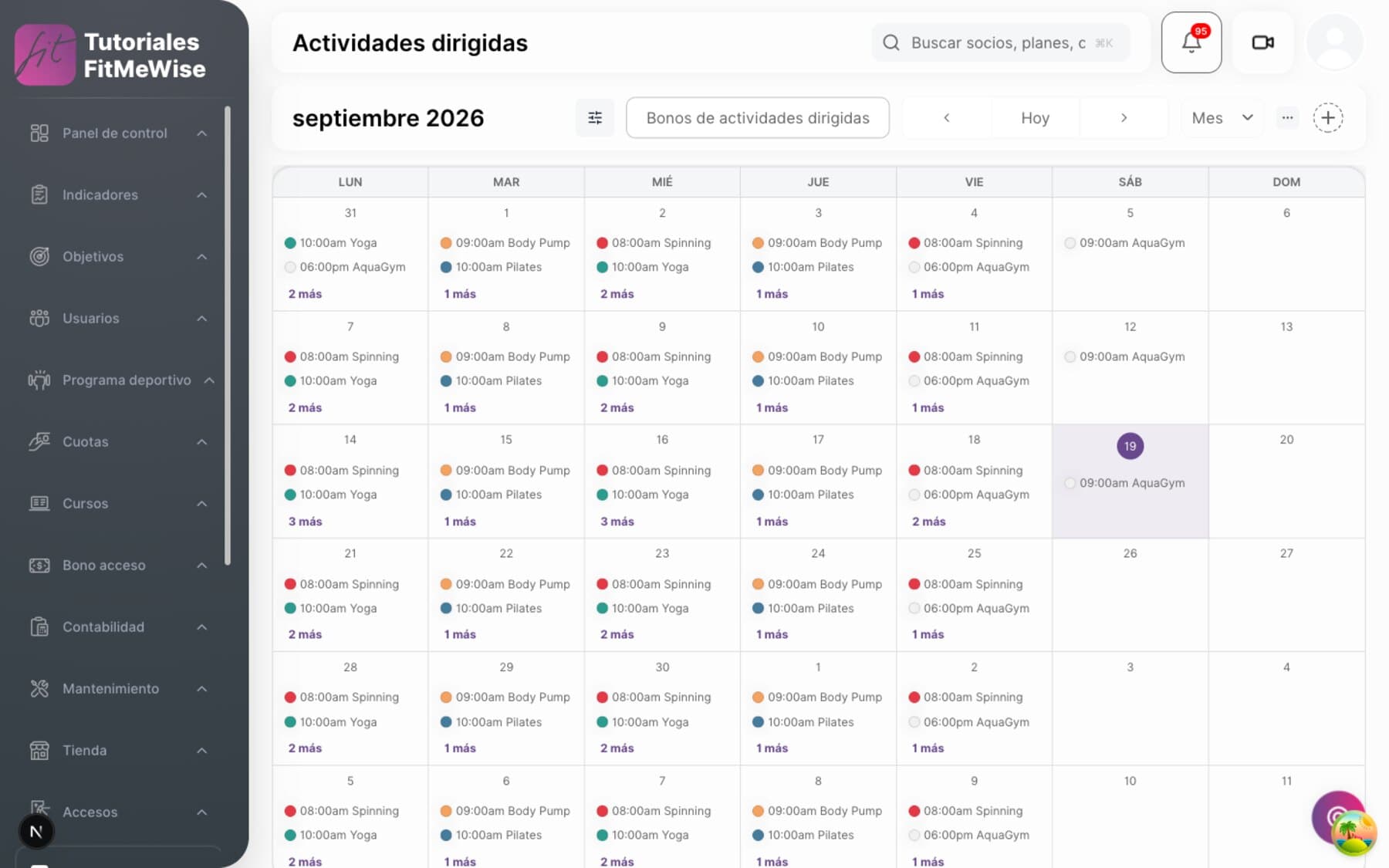
- Weekly recurrence on the days you tick, with its own capacity or inherited from the room
- Waitlist with a position, and you can require a pass with a balance to sign up
- Sessions are generated automatically when you save the pattern, up to 3 months ahead
How each class is defined and generated
- The timetable and the sessions are different things — you build the pattern once («spinning, Mondays and Wednesdays at 19:00») and the individual calendar sessions are generated from it, each with a life of its own: you can change the instructor of a single one without touching the rest.
- Weekly recurrence, not monthly yet — with no days ticked it generates a daily class; with days ticked, weekly on those days. There is no «every 2 weeks» or monthly recurrence: the interval is fixed at 1.
- Capacity per class, or inherited from the room — you set the capacity for that class, or leave it blank and the room's capacity applies.
- Waitlist with a place in the queue — it is switched on per branch, each member joins with their order number and their status (waiting, promoted, left), and you can require them to have a balance on a pass to sign up.
- Instructor and room assigned to the class, and if you delete the instructor's profile, the class doesn't fall apart: the field is simply left empty.
- Sessions are generated in the background — saving the pattern doesn't write them instantly: an event triggers the generation, and when all is well the first sessions appear in 1.65 seconds and a full month in about 6. The horizon is 3 months; beyond that date there is no session yet, even though the pattern exists.
You decide how much notice you give for booking and for canceling
You set the advance-booking hours, the cancellation window and what happens to anyone who books and doesn't show up. After that it applies itself, session by session, and your team stops negotiating it at the front desk.
- Maximum and minimum notice for booking, and a cancellation window without penalty
- Five different responses to a no-show, from a simple warning to an extra charge
- Recurring booking for a whole quarter, with nothing surviving past its end date
All the booking rules, and what happens if something fails
- Booking notice — maximum days ahead and minimum minutes before it starts, configurable per branch and per family: group classes can open 7 days ahead and physio 30.
- Cancellation window — the cut-off hours for canceling without penalty, and you decide whether canceling in time gives the session back to the pass or the balance back to the wallet.
- No-show, with five responses — warning only, removal from the waitlist, booking ban, charge for an extra session or a surcharge on the fee. With a number of forgiven absences before it starts to penalise.
- Turnstile check-in — you can require attendance to be validated by going through the turnstile, with a window of minutes before and after the session for it to register.
- Bulk or recurring booking by period — a member books every Tuesday and Thursday at 19:00 from 1 September to 30 November in one go; they can skip the session if it's full or if they exceed their allowance, and nothing is generated after 30 November.
- No double booking of the same person in the same class — the system blocks it at database level.
A pass decides how many sessions are left, whether it expires and whether it carries over
You sell ten physio sessions and the system keeps the count: it deducts when you book and closes the pass when it runs out or expires. At the front desk nobody ticks off sessions in a notebook.
- Session pass or wallet pass, with its own expiry or no expiry
- What isn't used carries over on renewal, up to the cap you set
- Every booking makes clear what it deducted: the pass, the fee, a courtesy or nothing
How a pass works, session by session
- Two types of pass — session passes («10 physio sessions», or unlimited if you enter no number) or wallet passes, with a balance that gets spent.
- Configurable expiry — how many days it lasts from activation, or no expiry if you leave it empty. The pass moves through pending payment, active, used up and expired, and the member sees it in their app.
- Carry-over on renewal — the sessions left over from one pass move on to the next, with an optional cap so they don't pile up indefinitely.
- Every booking makes clear what it deducted — the pass, the fee, a courtesy, or nothing. That avoids the «I'd already paid for that class» argument.
- Gym access pass — a separate family of pass, which opens the turnstile without booking anything and without depending on any service.
A room is booked just like a class or a session with the physio
A room, a court or a pool lane is booked with the same engine as a class or a service. Same allowance, same fee, only the family changes.
- Two levels: the facility, and what is actually booked inside it
- A court is booked on its own, with no group class needed behind it
- A zone's capacity can be left undefined, and that is not the same as zero capacity
What a room is, what a zone is, and their limits
- Two levels: the facility and the zone — the facility is the physical place, «Wet Area»; the zone is what gets booked inside it, a specific court or pool lane.
- Capacity per zone, optional — it can be left undefined, and that means «no declared limit», not zero capacity.
- A space is booked just like a class or a service, with the same engine and the same fee allowance. The only thing that changes is the family it belongs to.
- A zone doesn't need to be inside a facility — a standalone outdoor court is a valid case.
- Clash between two bookings in the same zone and time: not yet. The system doesn't warn you if two schedules overlap in the same space; for now it is up to whoever builds the timetable.

The catalog of classes, services and spaces belongs to each branch
Each branch sets up its own classes, services and zones without stepping on the others. Opening a new branch doesn't force you to go back over the other branches' catalog.
- Activity types, service families and zones: always tied to a specific branch
- A plan can allow booking at another branch in the chain, if you switch it on
- «Multi-center» doesn't exist as a single switch: it is configured plan by plan
What belongs to each branch, and what can cross over
- The catalog of activities and spaces belongs to each branch, it isn't one shared across the whole chain: the city-center branch and the beach branch needn't offer the same things.
- The families of activities, services and spaces are also per branch — they are configured one by one in each branch, although the five base families are seeded the same way in all of them.
- Each zone belongs to a specific branch, its own since 29/08/2026 and no longer inherited from the room that contains it.
- Booking at another branch, plan by plan — you can allow a member's fee or plan to book activities, services or spaces at another branch in the chain, but it is a box you tick per plan and per family, and that branch must be among the plan's branches and have the cross-branch booking permission switched on. It is not open access.
- «Multi-center» as a single concept: it doesn't exist. This is a deliberate decision: there is no switch that opens the whole chain to a member in one go.
LAIA answers for the member
The member asks in the chat — which classes are on Tuesday afternoon, whether there's room in the 20:00 body pump, when their pass runs out — and LAIA replies with the gym's real calendar and the places left at that moment, not with a hand-written script. The member completes the booking from the app or from the link LAIA leaves in the conversation.
What people tend to ask about this module
Can I set a different capacity for the room and for the class taught inside it?
Yes. You set the class capacity or leave it empty and it inherits the room's. The two levels are independent.
What happens if a member doesn't turn up to a booked class?
You choose the response: just a warning, removal from the waitlist, booking ban, an extra charge or a surcharge on the fee. And you can forgive a number of absences before it starts to penalise.
Can I set up fortnightly classes, or only weekly?
For now only weekly on the days you tick, or daily if you tick none. Fortnightly or monthly isn't built yet.
Does the system warn me if two classes clash in the same room at the same time?
Not yet. For now it is up to whoever builds the timetable to check that two schedules don't overlap in the same space.
Modules that often go with this one
Want to see it working?
We'll show it to you with your own case: your fee types, your branches and whatever currently forces you to use two programs.
Request a demo