
The map of your gym: machines, rooms, incidents
You register every piece of equipment and every room with its floor plan. When something fails, the incident carries its SLA, its work order, its parts and its cost, and reporting it doesn't require being logged in.
Every machine and every room, with its own record
You register the machine once — brand, serial number, warranty and where it sits on the floor plan — and everything that happens to it afterwards lands on that record. When someone asks how treadmill 4 is doing, the answer is on a screen and not in the technician's memory.
- Equipment record: brand, model, serial number and warranty
- Room floor plan, with the exact position of each machine
- Categories with an owner and a default SLA priority
What each asset's record stores
- Equipment: code, name, brand, model, serial number, purchase date and warranty expiry date, plus its position marked on the room's floor plan.
- Room or space: code, name, floor, and the image of its floor plan, so you can show where each machine is.
- Categories in a tree, each with a default owner and a default SLA priority: you register a piece of equipment in that category and it already inherits who to notify and within what time.
- Date of the last and the next preventive maintenance, stored on the equipment record itself.
- Everything by branch. Each category, room and piece of equipment belongs to a specific branch, not to the whole company.
A breakdown is reported without logging in
Anyone who sees the breakdown reports it with a link, whether or not they have the app open. Each priority sets its own response and resolution times.
- Report without logging in: a direct link is enough
- Each priority sets its own response and resolution hours
- Closing is always justified: repaired, or not repaired with a reason
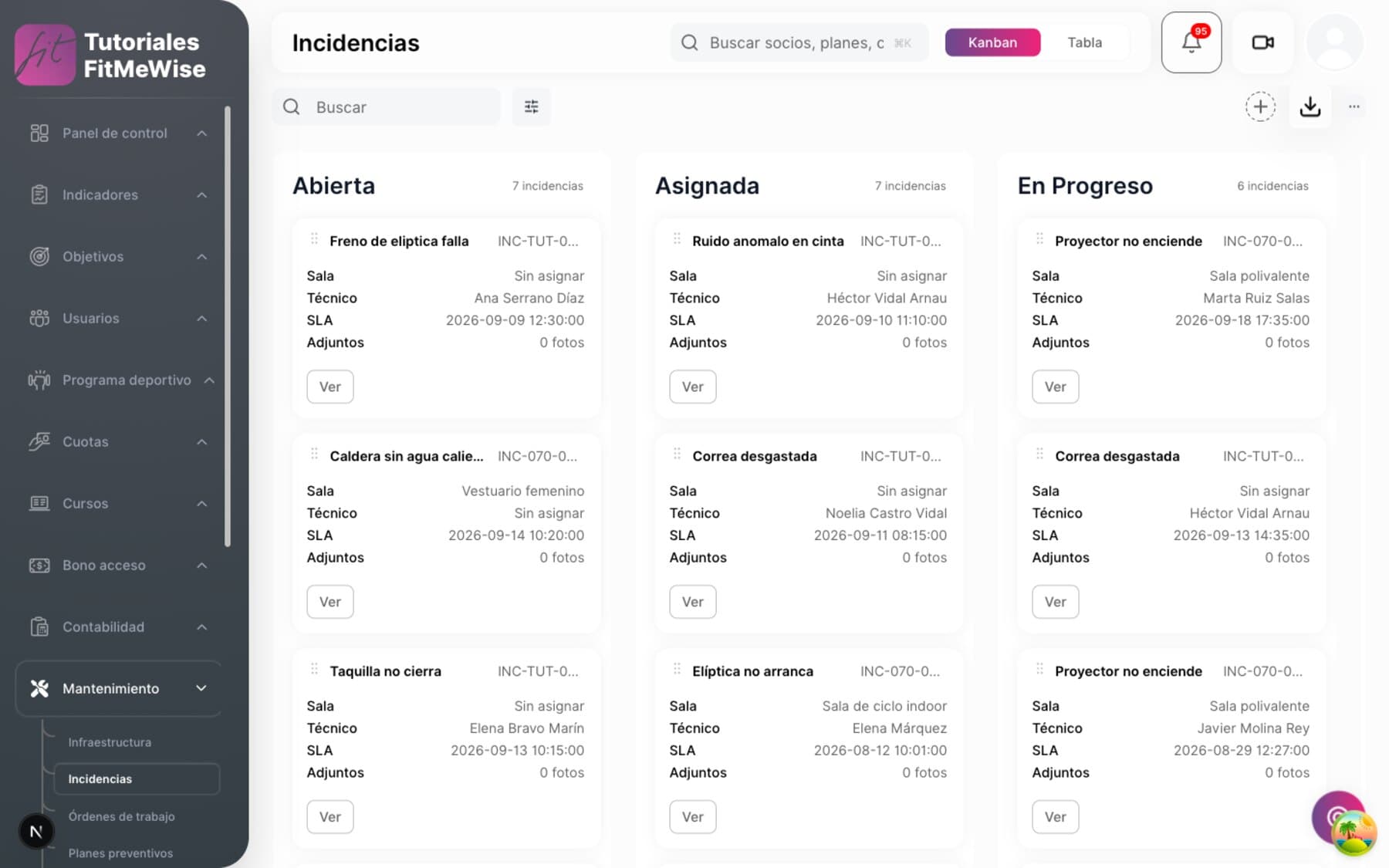
How an incident is reported and followed
- Two routes, always tied to a piece of equipment or a room. Staff report it while logged in, and there is also a public report with no login needed, designed for a direct link. It is never tied to both at once or to neither; in the public report, the branch is worked out automatically from the equipment or room selected.
- SLA by priority: each level has its own response and resolution hours (for example, 2 hours to respond and 24 to resolve on the highest priority).
- Assignment to the technician, available as a dedicated manual action. The automatic assignment rule by category exists and works, but today it only fires when the work order is generated, not at the moment the incident is reported.
- Close without repairing, with a written justification, for cases that need no intervention.
- Full history of status changes, and comments on the incident, so everything discussed is on record.
- Coming soon: attach a photo to the incident. Today it only accepts a link to a file that already exists elsewhere, not a direct upload.
The work order: parts, cost and evidence
The work order comes out of the incident, with an assigned technician, accumulated cost and spare parts with their supplier. You generate the order; the rest is calculated for you.
- Generate the order from the incident; the technician is assigned automatically
- Photo or video as evidence, up to 10 MB
- Spare parts with minimum stock, average cost and a rated supplier
What the work order and the parts store control
- Generating the work order from the incident triggers automatic assignment by category and calculates the SLA deadline in the same step. The total cost accumulates on its own from the materials actually used, and the technician leaves a photo or video (JPEG, PNG or MP4, up to 10 MB) as evidence of the work.
- Execution checklist: you create it and complete it step by step from the order itself. Coming soon: having it copied automatically from a template when the order is generated; today the steps are added by hand.
- Spare parts with minimum and target stock, weighted average cost — the same criterion the Store module uses — and a supplier with its on-time delivery record and quality rating. The purchase order for spare parts carries supplier, expected delivery date, amount and status, with each line linked to the incoming movement in the stockroom.
- Coming soon: stock deduction when a part is used. Today the incoming or outgoing movement is recorded, but the spare part's stock is not recalculated automatically.
- Preventive maintenance: you define the recurrence of a plan and run it when it's due. Coming soon: having it fire on its own on its date, without anyone having to launch it by hand.
- Coming soon: unified management panel. Everything above already works through integration; the screen in the Fitmewise panel to run it at a glance is under construction.
What people tend to ask about this module
Can a member report a breakdown without calling the front desk?
The report without logging in already exists and requires no login, designed precisely for that, but today no channel in the app links to it yet: that complete journey is coming soon.
Is preventive maintenance generated automatically, or do I have to remember?
Today you have to launch it when it's due: the recurrence is saved, but the automatic trigger on the scheduled date isn't built yet.
Can I control the workshop's spare-parts stock?
Yes: each spare part has minimum and target stock, weighted average cost and a supplier with its on-time delivery record. Automatic stock deduction when a part is used is pending; today the movement is recorded by hand.
Can I see all this in a panel, or only through integration?
Today through integration: the data model and the rules for assets, incidents, SLAs, work orders and parts already work. The unified screen in the Fitmewise panel is under construction.
Want to see it working?
We'll show it to you with your own case: your fee types, your branches and whatever currently forces you to use two programs.
Request a demo