

All your KPIs already calculated
125 indicators, 77 charts and 43 tables ready out of the box, by branch or combined, updated every day. And if you're missing one, ask LAIA and she builds it for you with your data.
You don't start from zero: the catalog is already calculated
125 indicators, 77 charts and 43 tables are already calculated across 101 business metrics. You request them by branch or by date range, ready built, without touching anything yourself.
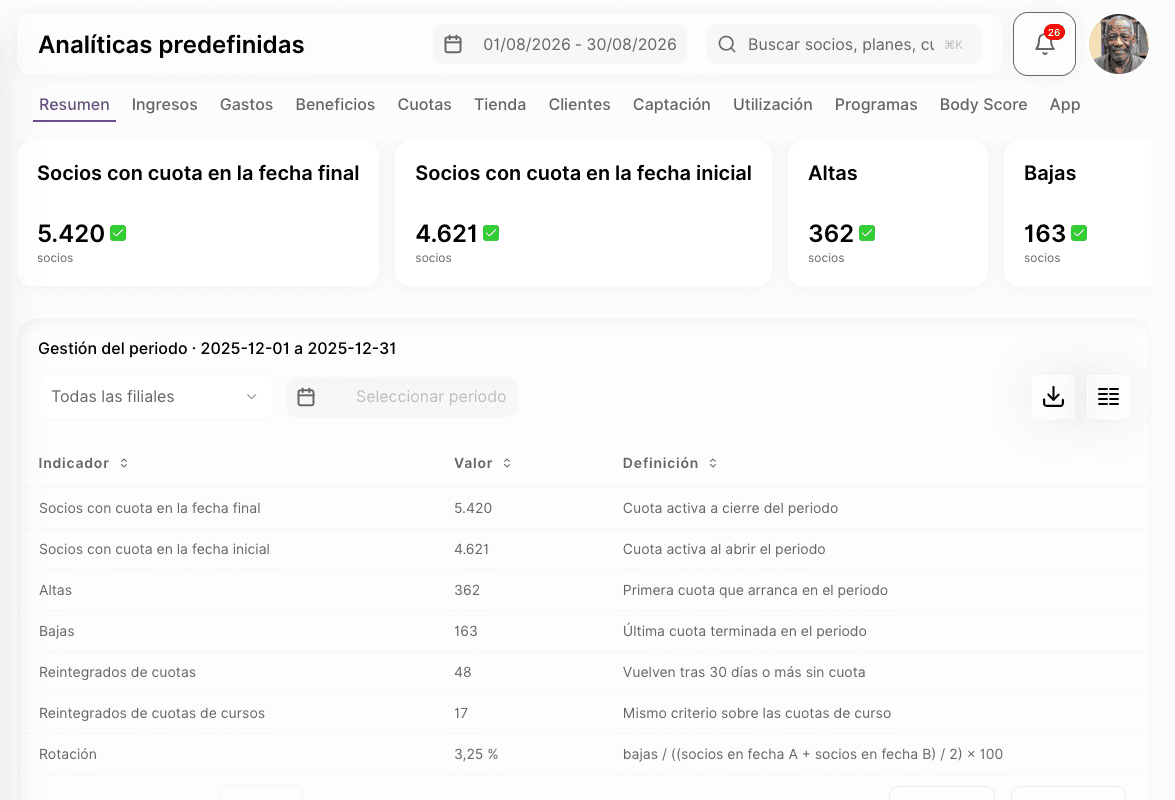
- 101 business metrics: fees, revenue and expenses, bookings, leads, sales, passes, access
- 125 predefined indicators and 77 charts, plus 43 aggregate tables
- Every metric supports branch, date range, granularity and comparison against the previous period
The full catalog, metric by metric
- 101 metrics, including active fees, sign-ups, cancellations and fee renewals, revenue and expenses, bookings made, attended, no-shows and canceled, sessions delivered, places offered, leads open, created and closed, CRM tasks open and completed, interactions with the client, store sales (amount, units, cost and tickets), passes active and sold, and access attempts.
- 125 predefined indicators and 77 charts, from MRR and ARPU to customer churn.
- 43 ready aggregate tables, including revenue by branch, fees by plan and expenses by category.
- Every query supports branch, date range, granularity and comparison against the previous period. If no branch is specified, we reject it: we never serve the whole platform mixed into one number.
- Two ways of calculating — a live counter you see to the second, or an accumulator for a period that has already closed, depending on what you're measuring.
What isn't in the catalog, you ask LAIA for
In «New KPI» you write in your own words what you want to measure and LAIA builds the indicator. On the left you see it already calculated with your data, before saving anything.
- Count, sum, average, minimum, maximum or percentage over fees, charges, members, access and branches
- As a card, line, bars or pie, and with the period you have selected on screen
- Nothing is saved until you press «Save indicator»
How to build your own KPI, step by step
- You ask by typing: «Member sign-ups by branch this month», «Revenue by month for the last year» or «Cancellations by reason». LAIA decides what to count, how to group it and how to draw it.
- You see it before saving it: the result is calculated with your real data while you adjust it.
- Tweak it however you prefer, by talking to LAIA or by changing the builder's fields yourself.
- No technical names: LAIA and the builder talk about fees, charges, members, access and branches, never about tables or columns.
- From any answer: when LAIA answers a question with data, she offers you «Save as indicator» and opens the builder with the request already written.
The catalog doesn't always have your cut. You build your own tab
You build a tab with the indicators you look at, for one branch or for the whole company. It stays saved in its order, so by next Monday it's already done.
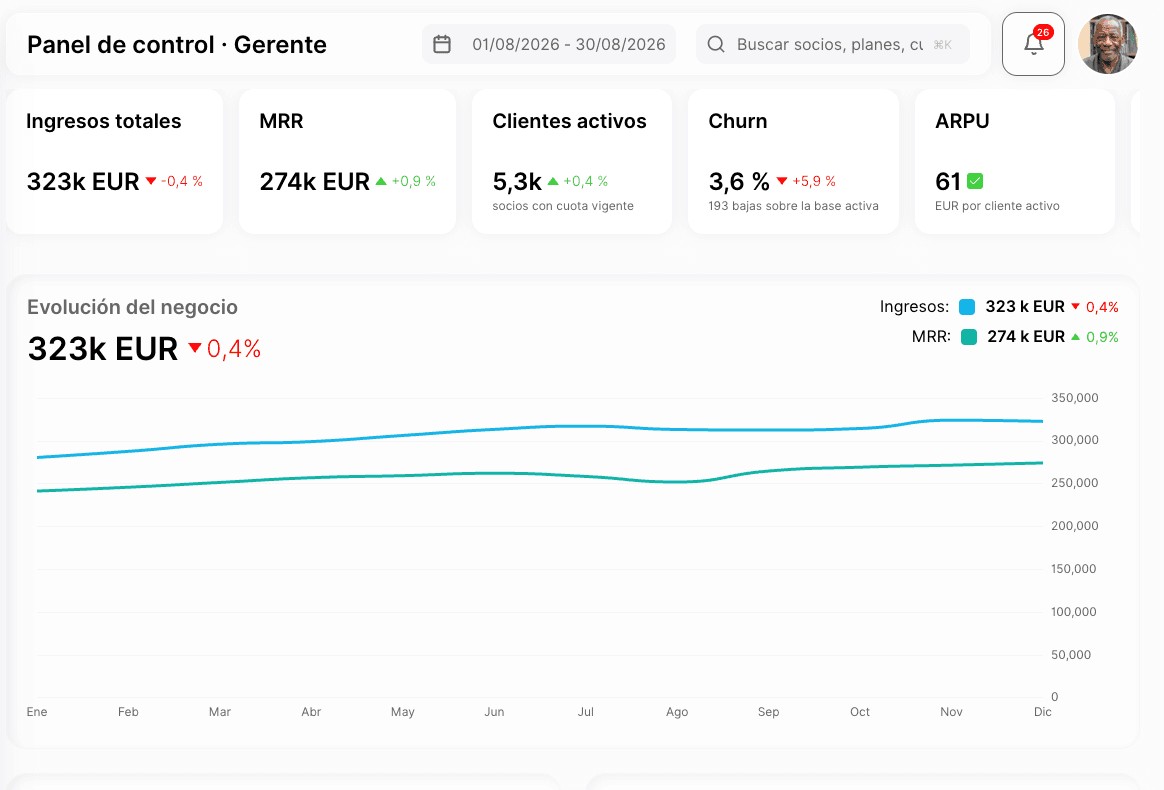
- Create as many tabs as you need, per branch or for the whole company
- Add indicators and charts validated against the catalog, never an invented metric
- Reorder and archive without losing anything: a dashboard is never deleted, only archived
What you can build and what limits apply today
- Create a tab — visible to the whole company or just one branch, with its own unique identifier.
- Add an indicator or chart — validated against the real catalog: the type must be indicator, line, bars or pie; the metric must exist; the granularity and the breakdown dimension must be supported by that specific metric.
- Order and size the widgets — each block takes half width or full width, and the whole order is saved every time you change it.
- No limit on indicators per tab — today there is no cap on the number.
- Archive, never delete — removing a tab or an indicator marks them as archived; they don't disappear from the database.
The numbers close themselves, every night and every month
Nobody needs to recalculate anything by hand. Every real change (a fee being activated, a sale, a booking) is projected onto your indicators in the background, and the day and month close run on their own.
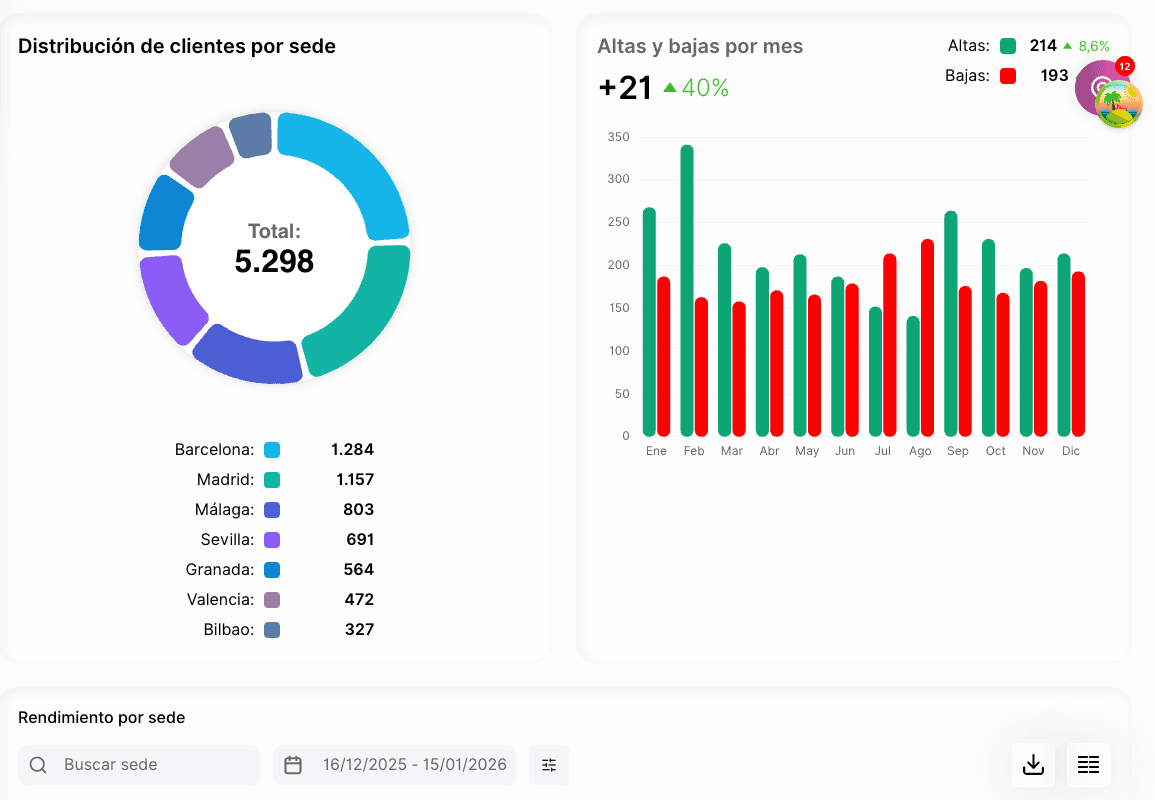
- Automatic close of the day at 00:10 and of the month on the 1st at 00:15
- Fees, billing, bookings, sales, passes, access and lifecycle feed the same engine, with no duplicated calculations
- A daily check warns you if a number has drifted; correcting it today is a separate step
How the data is calculated and checked, under the hood
- Background projection — every business change is queued and applied to the matching metric after it is saved, so you never read a half-confirmed figure.
- Daily close — every day at 00:10 the previous day's bucket is closed, for all branches.
- Monthly close — on the 1st of each month at 00:15 the previous month is closed.
- No weekly close, on purpose — the week starts on a different day depending on the branch, so the weekly series is built from the daily closes instead of being closed separately.
- Daily check — every day at 05:00 we check whether any number has drifted from what it should be. Today that check only alerts: if it detects a deviation, correcting it is a separate command, not something automatic.
Any list can be exported in one click
The export button comes by default on every table. 77 different lists, spread across more than 20 areas of the product, already have their own export.
- CSV with encoding ready to open in Excel without broken accents
- It is generated in the background: you keep working and we let you know when the file is ready
- The download link expires: no member file is left open forever
How export works, from start to finish
- Format — CSV, with the UTF-8 BOM so Excel doesn't mix up accents. Coming soon: Excel and PDF; today the list engine only generates CSV.
- Asynchronous — you request the export, the system replies at once and builds the file outside your request. It tells you when it is ready, with how many rows and how large it is.
- The download link is a signed URL with an expiry date, not a permanent public link.
- 77 lists with their own export, across more than 20 areas: clients, fees, sales, movements and more.
- The indicators, charts and dashboards in this module are not yet exported through this engine — today we only export tabular lists from other modules.
Your own KPI, just by asking LAIA
You open «New KPI» and type what you want to measure, for example «member sign-ups by branch this month». LAIA builds the indicator and you see it calculated with your data on the left. You adjust it by talking or field by field, and nothing is saved until you press «Save indicator».
What people tend to ask about this module
Does the AI make up the numbers?
No. Every number comes from a calculation on your data. LAIA helps you build the indicator, and what you see before saving is already the real calculation. Predictions: not today.
Can I create a KPI that isn't in the catalog?
Yes. In «New KPI» you ask LAIA in your own words or build it yourself field by field: what to count, how to group it and whether you want it as a card, line, bars or pie. You see it with your data before saving it.
Can I build a dashboard with only the indicators I care about?
Yes. You create your own tab, add the indicators and charts you need from the already validated catalog, and arrange them as you like.
Can I export my indicators to Excel to take to a meeting?
Today you export to CSV, which opens fine in Excel. The .xlsx format and direct PDF arrive in the next release.
How often are the numbers updated?
Live counters update instantly. The daily close runs every night at 00:10, and the monthly close on the 1st at 00:15.
Modules that often go with this one
- CRM and customer lifecycleEvery prospect with their stage, their owner and their follow-up date.See the module
- Fee, access and facility usage controlYou set once what each fee allows, and the turnstile enforces it on its own.See the module
- Payments, invoicing and integrated accountingCharge, invoice and reconcile the bank without leaving Fitmewise.See the module
Want to see it working?
We'll show it to you with your own case: your fee types, your branches and whatever currently forces you to use two programs.
Request a demo