

Don't let a lead go cold for lack of follow-up
35 sales, retention and charging flows already built: you switch them on one by one from draft and from then on they write, wait and alert your team on their own. Four kanban boards and a history of every stage change cover the rest.
This is how it sells and wins back on its own
Two of the 35 sales, retention and payment-collection flows that come ready-made. You activate them one by one from draft, and from then on they run on their own.
Laura, 34, messaged on Instagram on a Tuesday at 22:10 asking about the spinning timetable
- Trigger
A new lead comes in
Here she is: Laura, from Instagram
- ButtonsWhatsApp
Welcome message with 3 buttons
As it's night-time, it is held until 9:00 the next day
- AIWhatsApp
LAIA replies and offers the plan
- Condition
Hot lead?
High temperatureLow temperature - Wait
2 days without booking a visit
2 days
- MessageWhatsApp
Welcome offer
First month at half price, valid for 72 hours
- Task
Call: hot lead not yet closed
Task for Paco (Sales)
- End
Sign-up completed
Joins after talking to LAIA
A different board for every stage of the member journey
A prospect who has never set foot in your gym and a member about to cancel aren't handled the same way. That's why each sales process has its own kanban, its own columns and its own assigned salesperson.
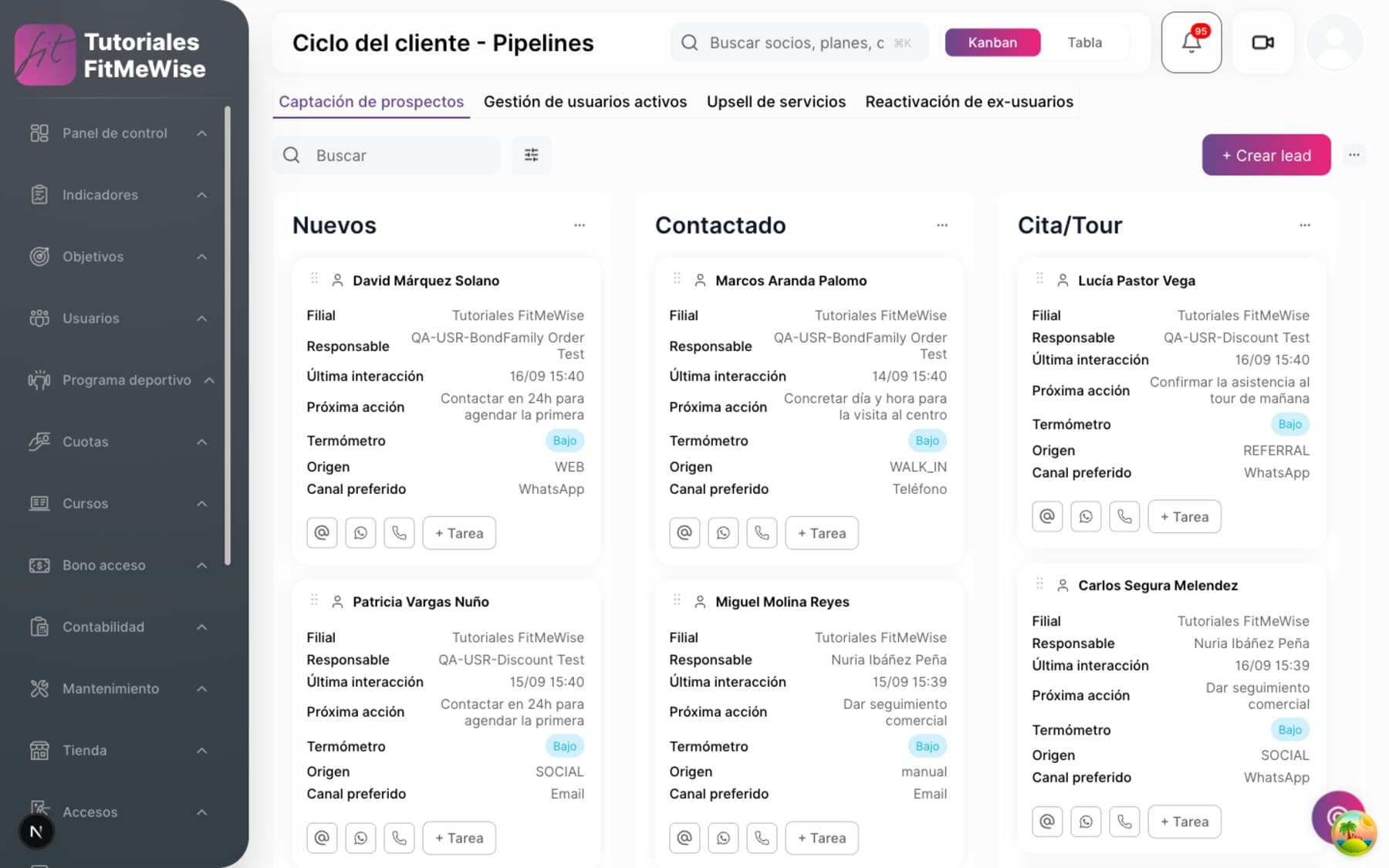
- 4 kanban boards out of the box: Acquisition, Active member management, Upsell and Reactivation
- Drag a lead to another column and it is logged: who moved it, or whether it was automatic
- Rename a stage or add a new one without touching code: they are configurable per branch
The stages of each of the 4 pipelines, one by one
- Prospect acquisition — 7 stages: New → Contacted → Appointment/Tour → Trial/Class → Offer sent → Closing pending → Won/Lost.
- Active user management — 5 stages: Active → At risk → Retention contacted → Retention offer → Saved/Canceled.
- Service upsell and Former-user reactivation — 4 stages each, and all four templates are edited per branch.
- Moving a lead to another stage is an action in its own right, not just a field change, and every move is kept in a history: from which stage to which, who did it and, if there is no owner, that it was moved by an automation.
- The stage lives in a table, not in a fixed value in the code: you rename a column or add a new stage without touching anything else.
Every call has an owner and a date, so no lead gets lost
A task without an owner doesn't get done. Every sales action carries a name, a due date and a reminder: nobody finds out too late that they were meant to call.
- 5 task types: Call, Visit, WhatsApp, Email, Virtual meeting
- The reminder alerts you when you decide, through the channel you decide
- Daily limit, retries and SLA per branch; each task keeps its own history
How a task is managed from start to finish
- Task types — Call, Visit, WhatsApp, Email, Virtual meeting.
- Owner, due date and priority — each task has a due date, a priority and a status that already includes «overdue», as well as pending and done.
- Its own reminder — how many minutes before it falls due and through which channel it alerts, configurable task by task.
- Recurrence — a task repeats on its own according to its own rule, without anyone having to recreate it by hand each time.
- Per-branch settings — reminder minutes, retries, daily task limit, SLA in hours and the time of the overdue alert, all adjustable branch by branch.
- Activity log — each task keeps its history of events, so you can reconstruct what happened and when.

Filter and know who to call today, not next week
With your lead portfolio growing every month, what separates a productive salesperson from a lost one is the right filter. Here it is, right on the kanban.
- Filter by free text, stage, owner, status, temperature, priority or date range
- The lead's status is a closed value: Active, Won or Lost, never free text
- Every contact with the lead is recorded with its channel: WhatsApp, chat, email, phone call or in person at the branch
What you can filter and what gets recorded
- Kanban filters — free text, stage, owner, status, temperature, priority and last-updated date range.
- Lead status — Active, Won or Lost, a closed value, not free text that each salesperson writes in their own way.
- Temperature and priority — also closed values, so «hot» means the same whoever writes it.
- Recorded interactions — every contact with the lead is saved with its channel (WhatsApp, chat, email, phone call, in person at the branch), who made it and the outcome.
- Coming soon: a list of leads with these same filters outside the kanban view, and a segmentation of members (not leads) by fee age or last visit — that endpoint doesn't exist today.
35 flows already built, ready to switch on
Sales, retention and charging: the 35 flows arrive as drafts and you switch them on one by one whenever you like, branch by branch. When you switch one on, the system checks that you have what it needs (for example, an appointment type for the visit or an activated Gem) and tells you if anything is missing.
- WhatsApp first, email if the lead has no WhatsApp; resend after a few days if they don't reply
- If they reply, LAIA answers and offers the fee; if a person is needed, it creates the task itself and assigns it
- Contact cap (it doesn't write if you've messaged them recently) and quiet hours, both per branch
How an activated flow works, from start to finish
- They are switched on one by one, from draft. All 35 arrive ready but switched off; switching one on checks that you have what it needs set up (an appointment type for the visit, a Gem, a template) and tells you what's missing if anything is.
- Channel with a fallback. It writes on WhatsApp first; if the lead has no WhatsApp, it falls back to email. If they don't reply in time, it resends or moves on to the next step of the flow.
- LAIA replies and offers. If the lead responds, LAIA carries on the conversation and offers them the fee or the service, with «Are you still interested?» buttons that move their stage with one click.
- When a person is needed, LAIA creates the task. Assigned on a rota among sales, among sales and front desk, or always to a specific person: it is configured flow by flow.
- Contact cap and quiet hours, both per branch: a flow doesn't write again to someone you contacted recently, and it respects the hours when nothing is sent.
- One flow can link to another. A lead who goes cold after 12 days without replying, for example, enters the monthly follow-up flow on its own.
- LAIA also designs flows. From her chat she analyzes why sales fall through or at which step people are lost, and suggests a new flow; she creates or edits it in the editor itself, always as a draft, so you can review it before switching it on.
- Overdue payments, with the same engine. One flow chases a late payment until it is collected, with the same cadence of channel, wait and task as the rest.
What people tend to ask about this module
Does the CRM alert me on its own when a member is at risk of canceling?
Yes. The «10 days without visiting» flow triggers by itself when a member stops checking in for the length of time you decide: it messages them on WhatsApp, lets LAIA book them into a class if they reply and sends a short challenge if they still don't come back. You switch it on from the catalog of 35 flows.
Can I have a different kanban for acquisition and for retention?
Yes. There are 4 out of the box (acquisition, active-member management, upsell and reactivation) and each has its own columns, editable per branch.
If a salesperson forgets to call a lead, will I find out?
Every task has a due date and its own «overdue» status. You set the time limit (SLA) and the time at which overdue tasks are flagged, per branch. And if a flow needs a person (the lead asks to talk to someone, or doesn't reply in time), it creates the task itself and assigns it on a rota among the sales team, among sales and front desk, or to a specific person.
Can I automatically assign new leads to a salesperson?
The tasks a flow generates are assigned automatically: on a rota across your sales team, with or without front desk, or always to the same person, depending on how you set up each flow. Assigning the lead itself on the kanban is, for now, still done by your team.
Modules that often go with this one
- Surveys and feedback collectionQuestions designed so members genuinely answer, not just to get it over with.See the module
- Multichannel bulk communicationYou pick the segment, launch the send, and know which channel really delivers today.See the module
- Fee, access and facility usage controlYou set once what each fee allows, and the turnstile enforces it on its own.See the module
Want to see it working?
We'll show it to you with your own case: your fee types, your branches and whatever currently forces you to use two programs.
Request a demo